quickshell
Feature-rich QML desktop shell for Hyprland with dashboard, launcher, media controls, and system monitoring
Overview
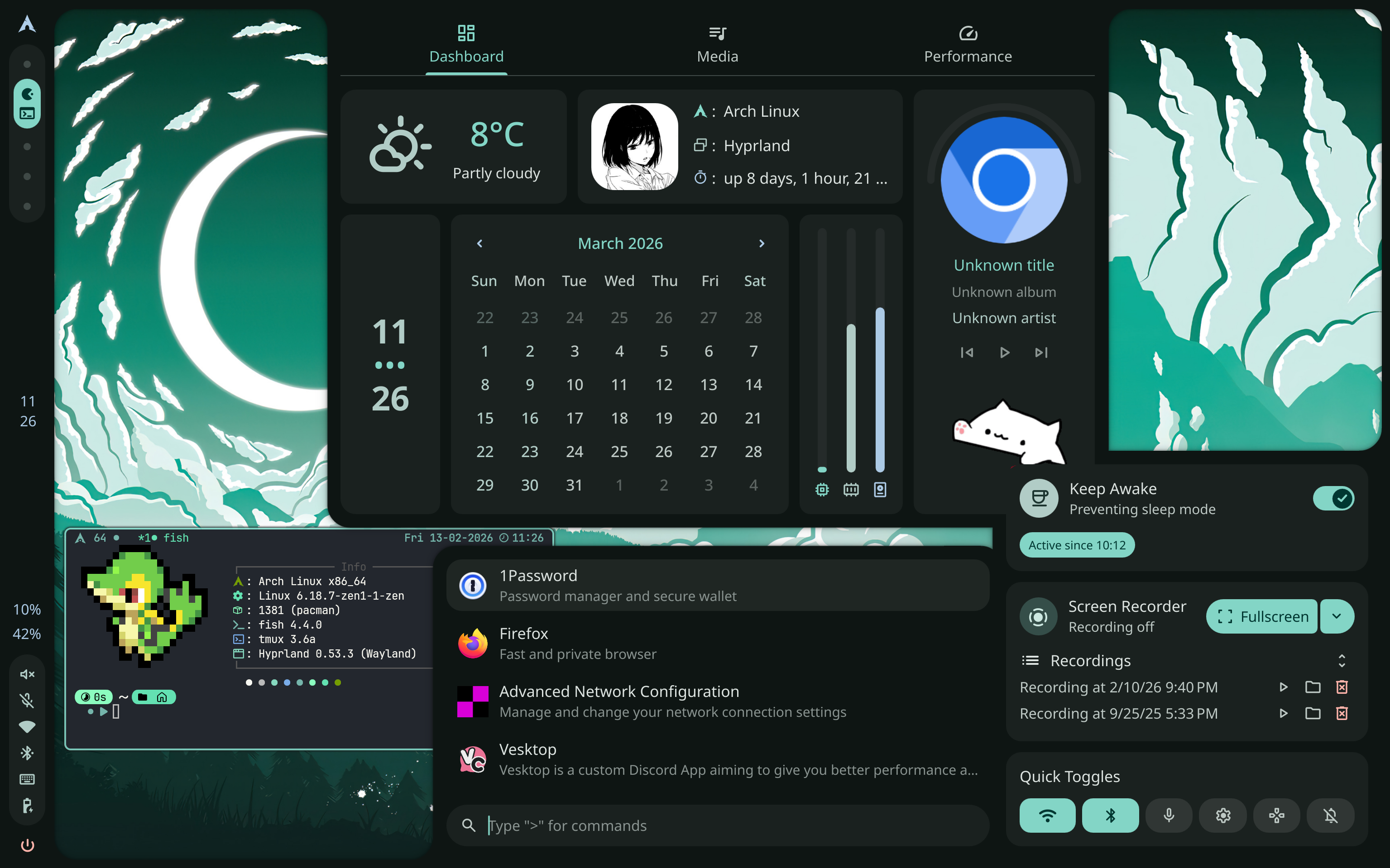
Caelestia Shell is a comprehensive desktop shell built with Quickshell for Hyprland. It replaces traditional status bars and widget systems with a unified QML-based interface featuring a dashboard, app launcher, media controls, notifications, sidebar, and more.
The shell is started via caelestia shell -d and is auto-launched through Hyprland's exec-once.
Shell Entry Point
The root shell.qml bootstraps all modules:
import "modules"
import "modules/drawers"
import "modules/background"
import "modules/areapicker"
import "modules/lock"
import Quickshell

ShellRoot {
    Background {}
    Drawers {}
    AreaPicker {}
    Lock { id: lock }
    Shortcuts {}
    BatteryMonitor {}
    IdleMonitors { lock: lock }
}
Module Architecture
~/.config/quickshell/caelestia/
├── shell.qml             # Entry point
├── config/               # QML config modules
│   ├── Config.qml
│   ├── AppearanceConfig.qml
│   ├── BarConfig.qml
│   ├── DashboardConfig.qml
│   ├── LauncherConfig.qml
│   └── ...
├── modules/
│   ├── bar/              # Status bar
│   ├── dashboard/        # Dashboard panel
│   ├── launcher/         # App launcher
│   ├── sidebar/          # Side panel
│   ├── controlcenter/    # Quick toggles
│   ├── notifications/    # Notification system
│   ├── background/       # Wallpaper & visualizer
│   ├── lock/             # Lock screen
│   ├── session/          # Session management
│   ├── osd/              # On-screen display
│   ├── windowinfo/       # Window preview
│   └── areapicker/       # Screenshot picker
├── components/           # Reusable UI components
├── services/             # System service integrations
└── utils/                # Utilities
Services
The shell integrates with the system through dedicated QML service modules:
| Service | Purpose |
|---|---|
Weather.qml | Real-time weather data |
Players.qml | MPRIS media player control |
Audio.qml | PipeWire audio management |
Brightness.qml | Display brightness (brightnessctl/ddcutil) |
Network.qml | NetworkManager integration |
Recorder.qml | Screen recording |
SystemUsage.qml | CPU, memory, GPU monitoring |
Wallpapers.qml | Wallpaper switching |
Colours.qml | Dynamic color scheme |
Time.qml | Clock and calendar |
Dashboard
The dashboard panel includes:
- Weather widget with temperature and conditions
- System info: OS, window manager, uptime
- Calendar: Full month view
- Profile picture (read from
~/.face) - Media player: Album art, track info, playback controls, volume sliders
- Keep Awake toggle to inhibit idle
- Screen recorder with recording history
Launcher
An app launcher with search and special action modes:
{
    "launcher": {
        "actionPrefix": ">",
        "specialPrefix": "@",
        "maxShown": 7,
        "vimKeybinds": false
    }
}
Built-in actions via > prefix: Calculator (Qalculate), Scheme switcher, Wallpaper switcher, Variant picker, power actions (shutdown, reboot, logout, lock, sleep).
Bar
A vertical status bar with configurable entries:
{
    "bar": {
        "entries": [
            { "id": "logo", "enabled": true },
            { "id": "workspaces", "enabled": true },
            { "id": "spacer", "enabled": true },
            { "id": "activeWindow", "enabled": true },
            { "id": "spacer", "enabled": true },
            { "id": "tray", "enabled": true },
            { "id": "clock", "enabled": true },
            { "id": "statusIcons", "enabled": true },
            { "id": "power", "enabled": true }
        ],
        "persistent": true,
        "showOnHover": true
    }
}
Supports scroll actions for brightness, volume, and workspace switching.
Quick Toggles
The control center provides quick toggles for WiFi, Bluetooth, microphone, display settings, and Do Not Disturb.
IPC
All shell features are controllable via CLI:
# Media controls
caelestia shell mpris playPause
caelestia shell mpris getActive trackTitle

# Toggle drawers
caelestia shell drawers toggle dashboard
caelestia shell drawers list

# Lock screen
caelestia shell lock lock

# Wallpaper
caelestia shell wallpaper set /path/to/image.jpg
Configuration
All user configuration lives in ~/.config/caelestia/shell.json. Key sections:
- appearance: fonts, padding, rounding, spacing, transparency
- bar: entries, scroll actions, workspace indicators, tray behavior
- dashboard: media update interval, drag threshold
- launcher: actions, fuzzy search, hidden apps
- services: audio increment, weather location, default player
- paths: wallpaper directory, media GIF, session GIF
CLI Configuration
The CLI tool (~/.config/caelestia/cli.json) manages theme propagation:
{
    "theme": {
        "enableTerm": true,
        "enableHypr": true,
        "enableDiscord": true,
        "enableBtop": true,
        "enableGtk": true,
        "enableQt": true
    }
}
Special Workspace Toggles
Caelestia manages special Hyprland workspaces for quick-access apps:
{
    "toggles": {
        "communication": { "vesktop": { "enable": true } },
        "music": { "spotify": { "enable": true } },
        "sysmon": { "btop": { "enable": true } },
        "todo": { "todoist": { "enable": true } }
    }
}
Triggered via Hyprland keybinds: super+M (communication), super+A (sysmon), super+N (todo).
Integration
Caelestia Shell integrates with:
- Hyprland via global shortcuts and IPC
- PipeWire for audio control and visualization
- NetworkManager for network status
- MPRIS for media player control
- xremap for system-wide key remapping
- Dynamic color schemes generated from wallpapers